For each part, order only when the shelf count is at or below its reorder point, and order enough to reach its top-up level. Reorder point = daily usage x (lead time + safety days). Top-up level adds the days until your next order. With no minimum order quantity, as at Parts4Cells, a small top-up order is fine.
The starting rows are example numbers, the same three parts as the stock planner worked example. Pack size is 1 for parts sold one at a time; for items sold only in packs the order is rounded up to whole packs. Your rows are kept in this browser only, so they are there next week.
How to use the list
- Add the parts you planOne row per part you keep on the shelf: usually screens and batteries for your most common models, plus charging ports.
- Fill in jobs, lead time and safety daysJobs a week from the last four weeks of your repair log. Lead time in calendar days from placing the order to the part tested on your bench. How many safety days
- Count the shelf on order dayEnter what is on the shelf now, before you order. Count tested stock only, not parts waiting for a return. How to count the shelf
- Send the listCopy the order and place it as one order. Parts above their reorder point stay off the list.
How the list is worked out
- Daily usage = jobs a week / 7
- Reorder point = daily usage x (lead time + safety days), rounded up
- Top-up level = daily usage x (lead time + safety days + days between orders), rounded up
- Order quantity = top-up level minus the shelf count, only when the shelf count is at or below the reorder point
- Packs = order quantity divided by pack size, rounded up, when an item is sold only in packs
These are the same formulas as the stock planner, so the two pages always agree for a single part.
Worked example: one weekly order
| Part | On the shelf | Reorder point | Top up to | Order |
|---|---|---|---|---|
| Screen, most common model | 4 | 5 | 11 | 7 |
| Battery, same model | 4 | 3 | 7 | 0, wait a week |
| Charging port flex | 1 | 2 | 4 | 3 |
The order for this week is 7 screens and 3 charging port flex boards, 10 units in one order. The battery shelf still covers the week, so it waits.

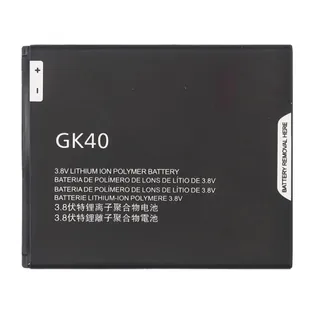
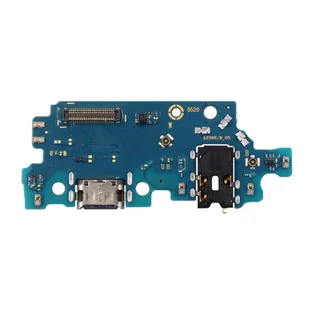
Photos: Parts4Cells. The models shown illustrate the three part types; the numbers in the example are not tied to them.
Which parts belong on the list?
- On the list: parts used at least once a week on models that still come in for repair.
- Off the list, ordered per job: parts used less than once a month, or repairs where the customer is happy to wait for delivery.
- Remove the row: when a model has not come in for a month. Let the last units sell through, or deal with them as slow movers.
- Batteries: keep their rows, but with small top-up levels and the oldest pack used first. The battery shelf calculator adds a shelf-time check.
How do you add screen protectors and other counter add-ons?
Use the same list, with a few changes. Screen protectors, cases and cables are sold at the counter, so their usage comes from your sales, not from repair jobs, and they are often bought in packs rather than one at a time.
- Count sales, not repairs. In the jobs a week column, enter how many units you sold a week over the last four weeks, from your till or point of sale records. A protector sold with every screen repair and one sold over the counter both count.
- One row per fit and finish. A clear and a privacy protector for the same phone are two rows, because one cannot stand in for the other. Some listings fit two models that share a screen size: the Parts4Cells tempered glass category lists kits such as one for the iPhone 13 Pro Max and iPhone 14 Plus (observed November 24, 2026). Then one row covers both models; check the listing title before you merge rows.
- Enter the pack size. If an item only comes in packs, enter the number per pack and the list rounds the order up to whole packs. Where items are sold one at a time, as in that category, leave it at 1.
- Only models that sell every week. The same rule as for parts: a protector that sells less than once a month is ordered per request, not kept on a row.
| Item | Sold a week | On the shelf | Reorder point | Top up to | Pack size | Order |
|---|---|---|---|---|---|---|
| Protector, clear | 9 | 3 | 7 | 16 | 10 | 20, two packs |
| Protector, privacy | 3 | 4 | 3 | 6 | 1 | 0, wait a week |
Both rows use a 3 day lead time and 2 safety days. The clear protector needs 13 to reach its top-up level of 16, so the list orders two packs of 10. The 7 extra units are not waste: they push the next reorder back by about five days at 9 sales a week. The privacy protector is still above its reorder point, so it waits.
Before you send the order
- Check stock on the supplier's site. If a part is out, your lead time for it is longer than the number in the row. Raise its quantity for the next order or source it per job.
- Compare like for like. If you price the order at two suppliers, compare the same quality grade by cost per good part, not list price. Cost per good part calculator
- Know how your tier is set. A tier based on monthly purchase volume rewards regular orders; a per-order discount rewards one large order. Tier models compared
After the order arrives
- Check the box against the order you sent: right models, right quantities, no damage. Arrival checks
- Test parts before they go on the shelf, and keep failed parts apart for return. Testing before install
- Note the day the parts were ready on the bench. If that differs from the lead time in a row, change the row.
- Once a month, update jobs a week from your repair log so the list follows what actually comes in.
Frequently asked questions
How is this different from the stock planner?
The stock planner works out the reorder point for one part and explains the method. The reorder list runs the same math for every part you stock at once, compares each with today's shelf count and lists only what to order this week.
Why does a part I counted not appear on the list?
Its shelf count is above its reorder point, so the stock you have covers the days until your next order day plus the safety days. It will appear on a later week once it drops to its reorder point.
Should the order be one order or several?
One order on a fixed day is easier to receive, test and track. Where a supplier sets its pricing tier on monthly purchase volume rather than on the size of one order, weekly orders do not cost you the tier. Check how your own supplier sets its tiers on the pricing tiers page.
How do I plan screen protectors that come in packs?
Add a row per protector type and model, enter units sold a week instead of repair jobs, and enter the pack size. The list works out the top-up quantity and rounds it up to whole packs. Leave pack size at 1 when the item is sold one at a time.
Worked examples use made-up numbers. Prices, stock and supplier terms change; confirm them on the supplier's own pages.